GeoServer image — Tomcat, JNDI, plugins, ephemeral data dir
Goal: a reproducible GeoServer image, configured solely through environment variables and Secrets, with all durable configuration living in the database. Version: GeoServer 3.0.1 (Tomcat 11, JDK 21).
flowchart LR
    subgraph Build["docker build (multi-stage)"]
        A[plugins stage<br/>SourceForge extensions<br/>+ OSGeo Nexus community modules] --> C
        B[build stage<br/>Maven: geoserver-init plugin] --> C
        C[final stage<br/>docker.osgeo.org/geoserver:3.0.1<br/>+ JARs + JNDI server.xml + bootstrap]
    end
    subgraph Run["pod startup"]
        D[bootstrap-datadir.sh<br/>env → ephemeral data dir] --> E[image startup.sh<br/>server.xml envsubst, admin]
        E --> F[Tomcat 11: JNDI jdbc/geoserver · jdbc/meteo]
        F --> G[GeoServer: JDBCConfig + JDBCStore<br/>load the catalog from the database]
        G --> H[geoserver-init: workspace, JNDI store, layer]
    end
C -. image .-> DDecisions: ADR-0005 (image,
data dir, security/), ADR-0006
(configuration via plugin), ADR-0007
(plugin provisioning). Artifacts: poc/02-geoserver-image/.
Prerequisites
- Sub-project 1 deployed (database,
db-admin,geoserver-db,meteo-readerSecrets). - Docker with BuildKit; an image registry reachable from the cluster (for the
local test bench:
registry:2on127.0.0.1:5000, which containerd accepts over HTTP without any configuration). - Outbound access to SourceForge,
repo.osgeo.organd Maven Central at build time.
Image contents
| Component | Type | Role | Source |
|---|---|---|---|
| GeoServer 3.0.1 | official image | Tomcat 11, JDK 21, hardening, startup.sh / install-extensions.sh scripts, admin management |
docker.osgeo.org/geoserver:3.0.1 |
wps |
extension | Web Processing Service | SourceForge |
wps-jdbc |
extension | WPS execution status in the database (shared across replicas) | SourceForge |
gwc-s3 |
extension | S3 blobstore for GeoWebCache (used in sub-project 4) | SourceForge |
control-flow |
extension | Limits the number of concurrent requests | SourceForge |
gs-jdbcconfig |
community | Catalog in the database | OSGeo Nexus (org/geoserver/community) |
gs-jdbcstore |
community | Resources (styles, security, GWC…) in the database | OSGeo Nexus |
geoserver-init |
in-house | Idempotent catalog initialization | geoserver-init/ (Maven) |
postgresql-client |
package | psql for first-boot detection |
apt |
The extension list is a build argument (STABLE_EXTENSIONS,
COMMUNITY_JARS): sub-projects 3 (cluster) and 4 (S3 rasters) extend it
without touching anything else.
Environment variables
| Variable | Source | Role |
|---|---|---|
DB_HOST, DB_PORT, DB_NAME |
db-admin Secret (these 3 keys only) |
Configuration database |
GEOSERVER_DB_USER, GEOSERVER_DB_PASSWORD, GEOSERVER_DB_SCHEMA |
geoserver-db Secret |
jdbc/geoserver resource |
METEO_DB_HOST, METEO_DB_PORT, METEO_DB_NAME |
geoserver-env ConfigMap |
Server / database holding the decoded data |
READER_USER, READER_PASSWORD |
meteo-reader Secret |
jdbc/meteo resource (read-only) |
GEOSERVER_ADMIN_USER, GEOSERVER_ADMIN_PASSWORD |
geoserver-admin Secret |
GeoServer administrator account |
PROXY_BASE_URL |
ConfigMap | Public URL in the capabilities |
GEOSERVER_INIT_WORKSPACE, GEOSERVER_INIT_DEMO_LAYER, GEOSERVER_INIT_METEO_JNDI, GEOSERVER_INIT_METEO_SCHEMA |
ConfigMap | Initialization plugin |
CONTROLFLOW_* |
ConfigMap | control-flow rules |
JNDI_*_MAX_TOTAL |
ConfigMap | Pool sizes |
EXTRA_JAVA_OPTS |
image (default) | JVM: MaxRAMPercentage=70, G1, ExitOnOutOfMemoryError, headless, forceXY, UTC |
The database admin account never enters GeoServer
The Deployment reads DB_HOST, DB_PORT, DB_NAME from the db-admin
Secret key by key; DB_ADMIN_PASSWORD is never referenced.
JNDI resources
Two Tomcat <Resource> entries, one per (URL, account) pair — fragment
config/jndi-resources.xml:
jdbc/geoserver:geoserveraccount, read/write, used by JDBCConfig, JDBCStore and the WPS status (jndiName=java:comp/env/jdbc/geoserverin their.properties);jdbc/meteo: reader account,?readOnly=true, used by the PostGIS datastores (jndiReferenceName).
Pool: SELECT 1 validation on borrow and while idle, 30 s eviction, 120 s
abandon, maxTotal set by variable. The PostgreSQL driver is in
$CATALINA_HOME/lib (provided by the official image) — a requirement for a
Tomcat JNDI pool to see it.
Pitfall hit while prototyping: conf/context.xml is ignored
The official image's server.xml declares the GeoServer context with
override="true" and its own jdbc/postgres resource: anything put
in conf/context.xml is ignored (symptom:
NameNotFoundException: Name [geoserver] is not bound, then the modules
falling back to localhost:5432/gsstore). The solution is an
overridden server.xml (/opt/config_overrides/server.xml),
generated by gen-server-xml.sh from the image's template by splicing in
our fragment, and installed by startup.sh with envsubst. Regenerate it
whenever the image version changes.
Data dir bootstrap (at every startup)
config/bootstrap-datadir.sh is the image's entrypoint; it ends with
exec bash /opt/startup.sh (official image).
| # | Action |
|---|---|
| 1 | Variable check (exit 2 with the list of missing variables) |
| 2 | Connects to the database with the geoserver account (exit 3 if unreachable); first boot? = do the object (JDBCConfig) and resources (JDBCStore) tables exist in the schema? |
| 3 | jdbcconfig/jdbcconfig.properties and jdbcstore/jdbcstore.properties: enabled=true, jndiName=java:comp/env/jdbc/geoserver, initdb/import = true only on first boot; the modules' SQL scripts copied from the image |
| 4 | jdbcstatusstore.props: dbtype=postgis, jndiReferenceName=java:comp/env/jdbc/geoserver, schema=geoserver |
| 5 | controlflow.properties from CONTROLFLOW_* |
| 6 | Exports the variables for the server.xml envsubst |
| 7 | Summary without secrets, then startup.sh (admin from GEOSERVER_ADMIN_*, SKIP_DEMO_DATA=true) |
The data dir is an emptyDir: nothing written to it is durable. On first
boot, JDBCStore imports the initial data dir (including the security/
created by the image: master key, keystore, users.xml) into the resources
table; on subsequent boots (import=false) everything is read back from the
database, including security/ — which makes the master key and the admin
account identical on all replicas.
Pitfalls hit at the prototype stage
- Do not pre-create
security/in the data dir: the image only copies the default folder there when it is absent (otherwiseusers.xmlnot found). - The message
ERROR [jdbcconfig.config] - Problem while reinitializing
  Logging from JDBC Config
appears on subsequent boots; logging works (default levels). Observed, non-blocking, to be monitored. - On first boot,
WARN [gwc.config] Cannot read resource gwc-gs.xml: GeoWebCache applies its defaults then persists them to the database; the message no longer appears afterwards. - The WPS status table name is
status(notwpsstatus).
Anatomy of the ephemeral data dir (what is on the volume, and why)
Inventory of a running replica's data dir (observed on the demo cluster).
Reminder of the frame: the volume is a disposable emptyDir — everything
that matters has its source of truth in the database (JDBCStore/JDBCConfig) or
in the environment variables; the disk is only a local materialization rebuilt
at every boot. Three families: (a) regenerated by the bootstrap from the
environment, (b) materialized from the database by JDBCStore, (c) regenerable
cache/scratch.
| Entry | Purpose | Nature |
|---|---|---|
cluster/cluster.properties, cluster/hazelcast.xml |
Configuration of the Hazelcast clustering module (discovery mode, service DNS, cluster name, sync method) | Regenerated at every boot from the HZ_* env variables; in JDBCStore's ignoreDirs, so local-only by design |
controlflow.properties |
Request-throttling limits of the control-flow plugin (max concurrent OGC requests, per-user caps) — protects the JVM under load | Written by the bootstrap at boot |
jdbcconfig/, jdbcstore/ (properties + scripts/) |
Configuration of the DB-backed-catalog modules themselves: which JNDI datasource to use, first-boot init flag, the SQL scripts that create their tables | Written at boot; local-only (ignoreDirs) — they must exist before the DB connection is up, so they cannot live in the DB |
jdbcstatusstore.props |
Points the WPS status store at the database (JNDI reference), so a WPS execution launched on one replica can be tracked from another | Written at boot |
security/ (users, roles, masterpw, keystore, layers.properties, service rules) |
Authentication and authorization state: admin user, roles, the master key that encrypts store passwords, per-layer and per-service access rules | Source of truth in the database (carried by JDBCStore — that is why all replicas share one master key, ADR-0005); the on-disk tree is the local materialization |
styles/*.sld |
The styles: GeoServer built-ins (default_raster, default_point…) plus ours declared as code via STYLE_BODIES |
DB-backed through the resource store; identical on every replica |
mosaics/<layer>/ (datastore.properties, indexer.properties, <layer>.properties, sample_image.dat) |
Per-mosaic ImageMosaic configuration written by the init plugin: which PostGIS schema/JNDI holds the granule index, which dimensions exist (time, elevation, run), plus a small cached sample the renderer uses for defaults | Created by geoserver-init; resource-store backed |
gwc/geowebcache.xml (+ timestamped .bak) |
Main tile-cache configuration: the S3 blobstore definition, gridsets. The .bak files are automatic backups GWC takes each time the config is rewritten (one per restart — harmless) |
DB/resource-backed; .bak files are local noise |
gwc-layers/ |
One XML per tile layer (which layers are cached, formats, gridsets) | Resource-backed |
legendsamples/*.png |
Tiny legend preview images the admin UI generates for the style pages | Pure regenerable cache |
logs/, tmp/ |
Local logs and scratch space | Local-only (ignoreDirs), disposable |
The operational takeaway: nothing on this volume is precious — kill the pod, and everything above is rebuilt from the environment variables and the database in under a minute.
The geoserver-init plugin
A GeoServerInitializer (official extension point, called after the catalog
is loaded) which, idempotently:
- creates the
${GEOSERVER_INIT_WORKSPACE}workspace and its namespace; - creates or updates the
meteo-dbdatastore of type PostGIS (JNDI) (jndiReferenceName,schema,Expose primary keys); - publishes the demonstration table as a layer.
The log states what it did (created / exists / verified). The following
sub-projects extend this plugin (S3 stores, mosaics, styles): all
reproducible configuration goes through it, never through the UI or REST
(ADR-0006).
"GeoServer in production" checklist
Manual recommendation (production/) |
Where it is applied |
|---|---|
| Java: sized heap, G1, headless | EXTRA_JAVA_OPTS (MaxRAMPercentage=70); the pod's limits.memory is the single source of truth |
| Container: no demo data, unnecessary applications removed, non-deterministic shutdown | official image (SKIP_DEMO_DATA=true, i_am_a_teapot) |
| Configuration: admin password changed | geoserver-admin Secret |
| Configuration: proxy base URL | PROXY_BASE_URL |
| Configuration: control-flow | controlflow.properties |
| Data: PostGIS via JNDI, validated pool | server.xml |
| Logging to standard output | Tomcat/K8s (kubectl logs) |
| Identifiable nodes (multi-instance) | sub-project 3 |
Steps
cd poc/02-geoserver-image
./gen-server-xml.sh                                   # once per image version
IMAGE=<registry>/meteo-gis/geoserver:3.0.1-poc ./build.sh --push
IMAGE=<registry>/meteo-gis/geoserver:3.0.1-poc ./deploy.sh   # admin Secret, ConfigMap, Service, Deployment (1 replica)
Private registry: deploy.sh references imagePullSecrets: regcred (adapt as
needed). The local test bench uses registry:2 on 127.0.0.1:5000.
Verification
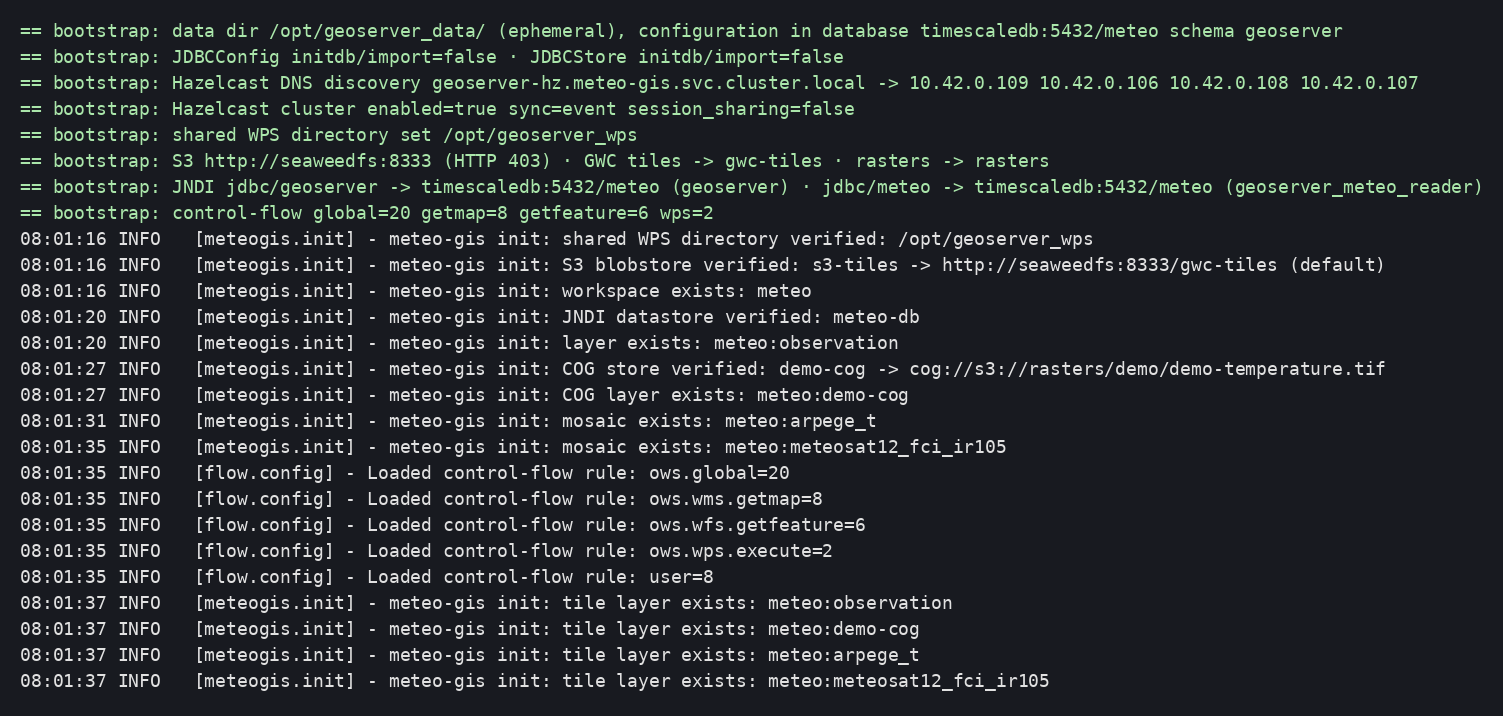
Startup log (bootstrap, JDBC modules, plugin, control-flow):
Tables and views created by the modules in the geoserver schema (object,
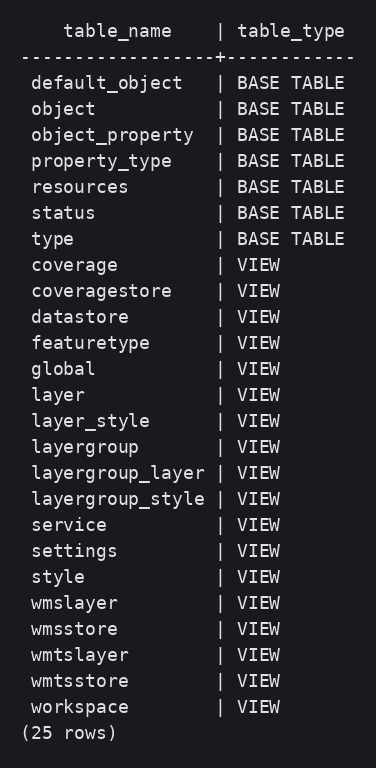
resources, status…):
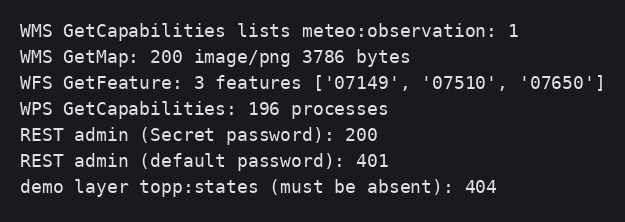
Services: layer present in the capabilities, GetMap, GetFeature, WPS (196
processes), asynchronous execution accepted, admin account from the Secret,
default one rejected, demo data absent:

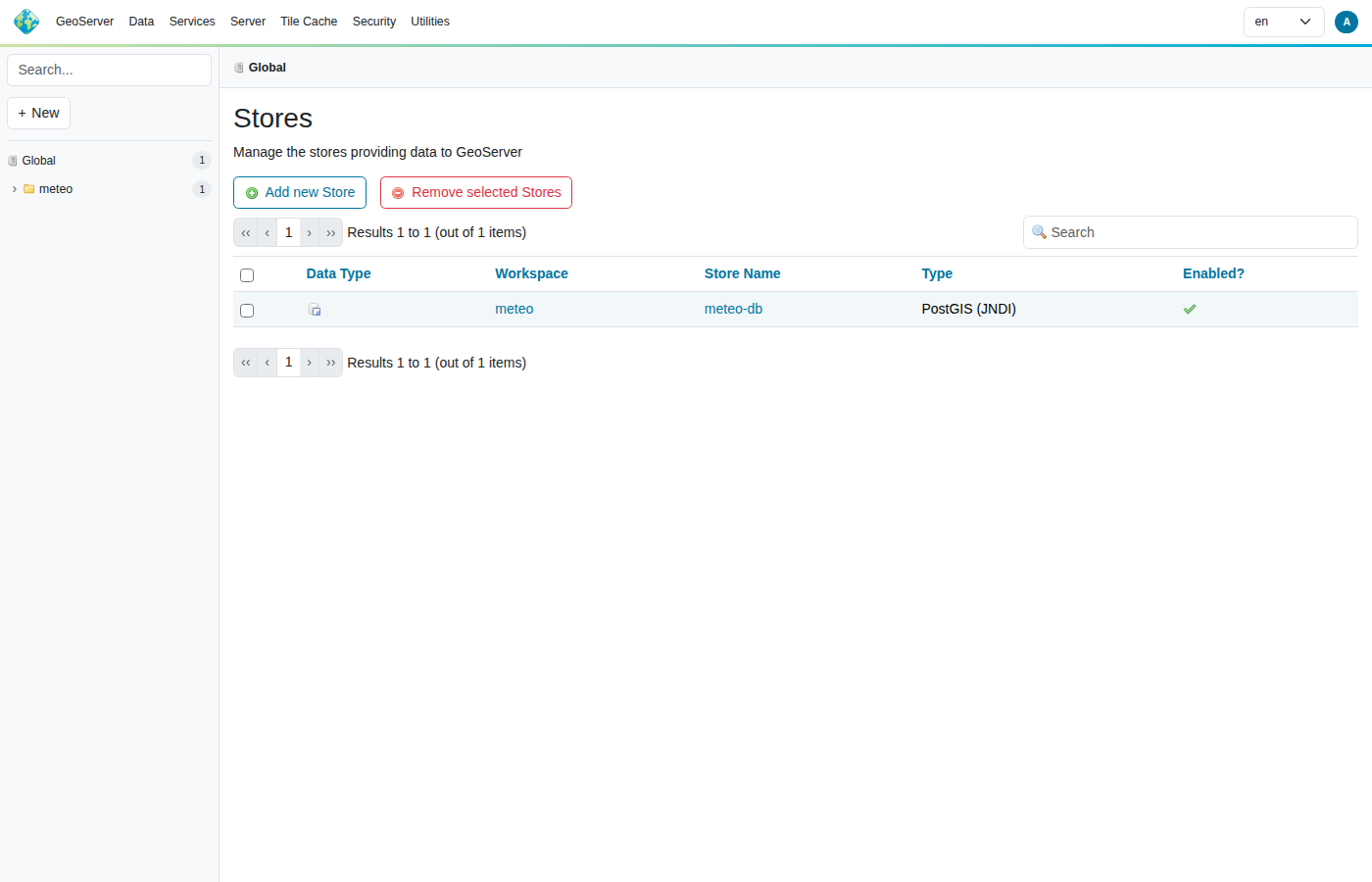
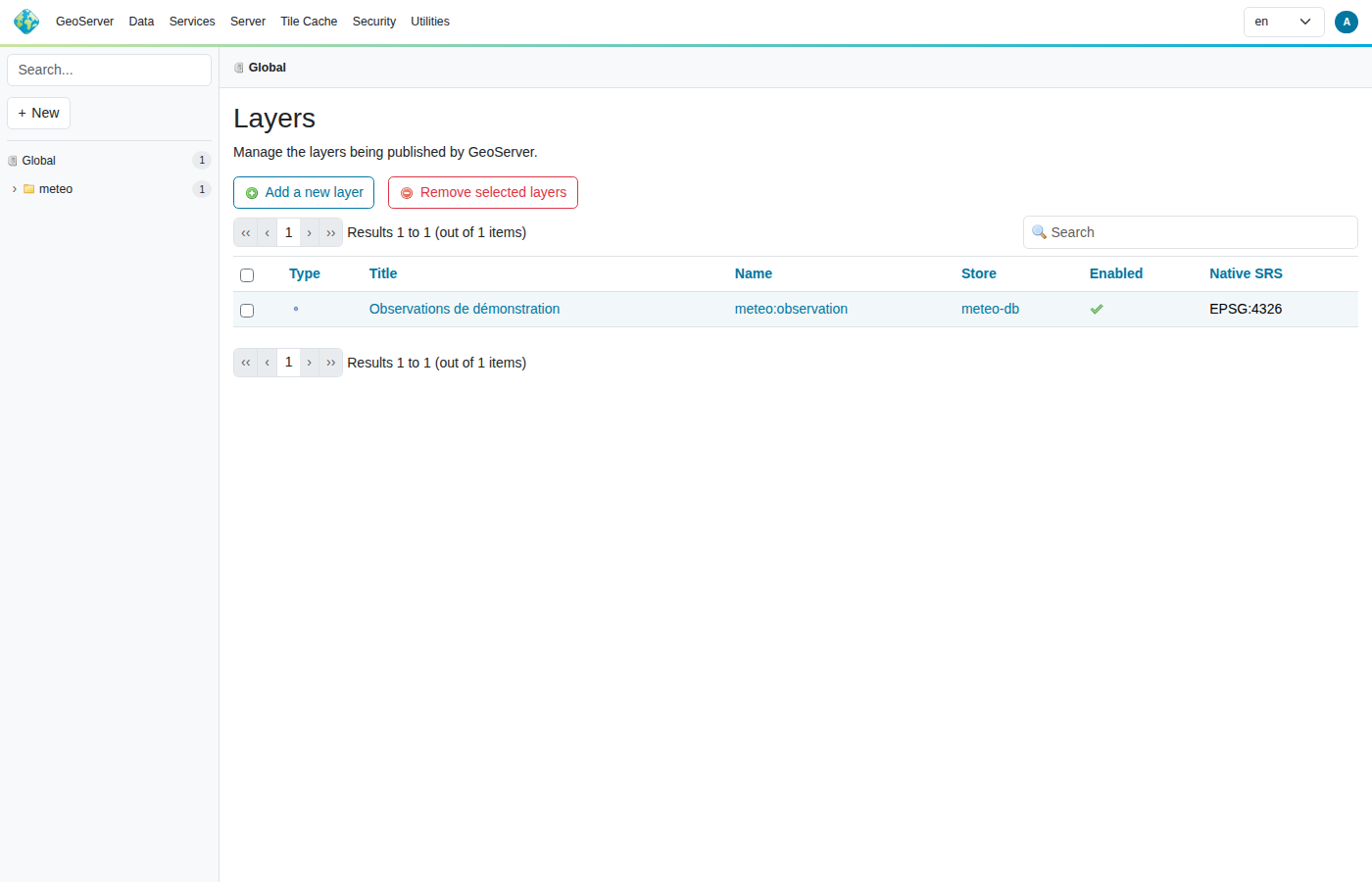
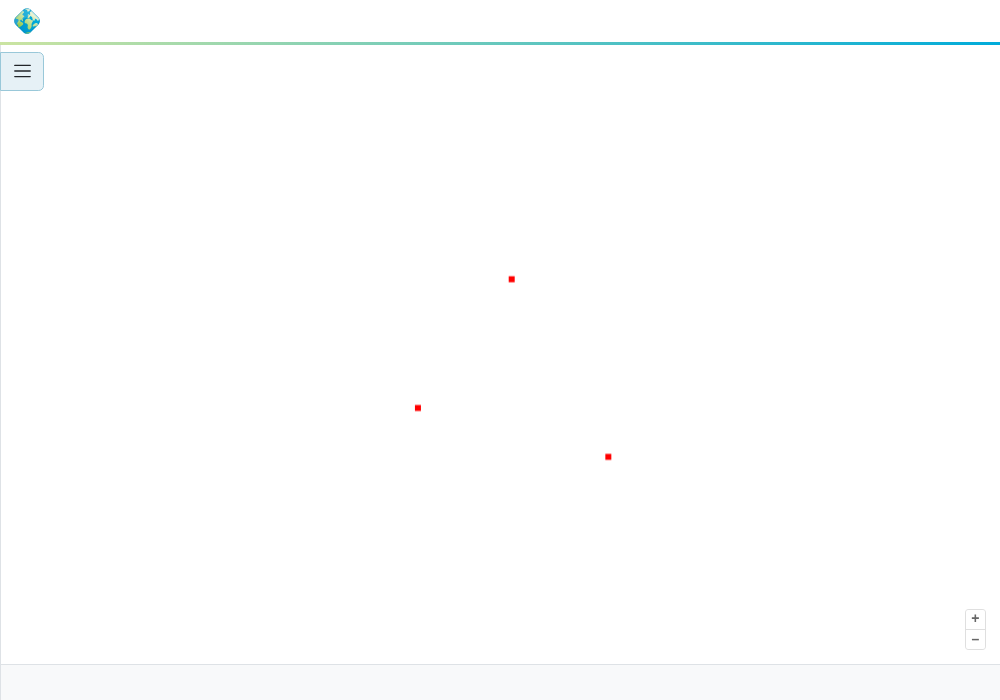
Administration UI: JNDI datastore and layer created by the plugin, preview:
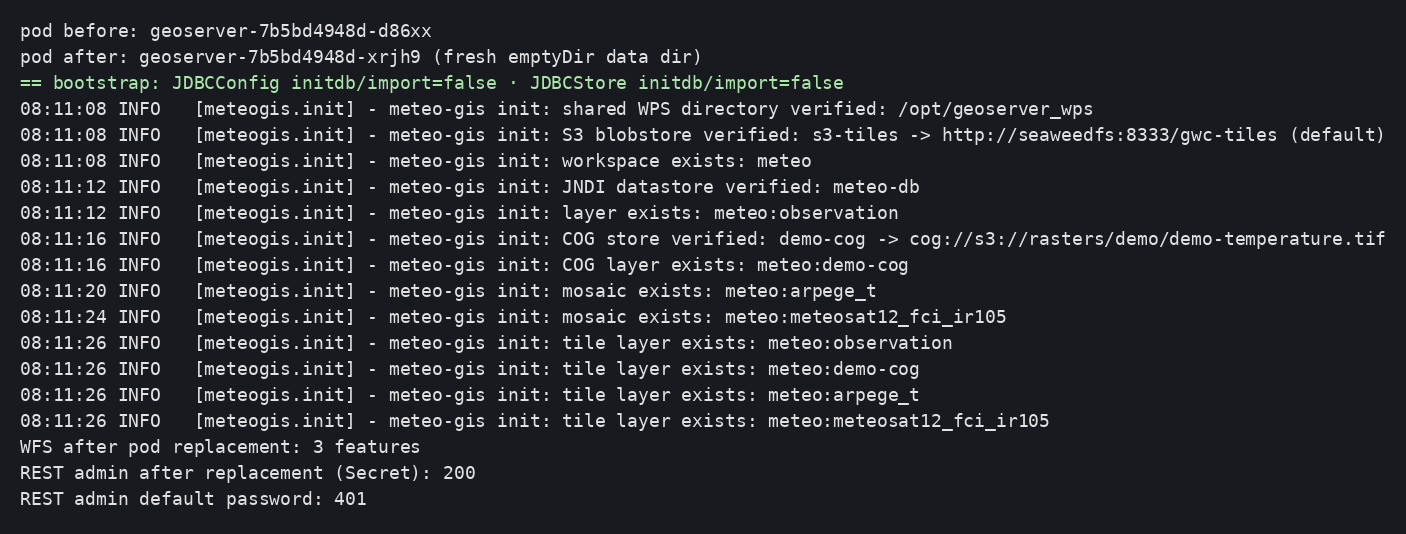
Resilience: pod deleted → new pod with a pristine emptyDir, import=false,
everything read back from the database, admin unchanged:
Deviations observed at the prototype stage
conf/context.xmlignored (override="true") → overriddenserver.xml.security/must not be pre-created by the bootstrap.- WPS status table:
status. - The PostgreSQL driver is already in the official image's
$CATALINA_HOME/lib. python3is absent from the image: theserver.xmlgeneration happens on the host side (gen-server-xml.sh), which in any case keeps the artifact reviewable.